Focus on sentiment analysis
Focus on sentiment analysis
With Skalin, 100% of the written conversations (emails, tickets...) you have with your customers are analyzed by an LLM that reads the content of your exchanges and assigns a score reflecting the customer's sentiment. This score ranges from 1 (very negative) to 5 (very positive). The analysis works in all languages.
The interaction score is calculated from:
- all incoming (IN) interactions scored by the AI: received emails and tickets,
- interactions with no written content that are scored manually: meetings, calls,
- notes scored manually or by the AI on internal notes.
Only incoming interactions count toward the score. Regardless of how politely you write to your customers, it is the sentiment they express that determines their score.
Tips
The color scheme lets you identify the type of interaction at a glance: scores for incoming interactions are colored (red, yellow or green), while scores for outgoing interactions appear in grey. These grey scores indicate how the AI would have rated the interaction, but they are not factored into the calculation.
To see the explanation behind an AI-generated score, simply hover over the AI label: the reasoning is displayed as an overlay.
Note
From a scoring point of view, the aim is not so much to measure a level of satisfaction at a given moment, but rather to track its evolution over time to detect any alteration in interactions and trigger alerts where necessary.
# Modification, exclusion of an AI-generated score
Once the AI has rated an interaction, you will see the small  label next to the score.
If you believe this score is not appropriate, you can click the circle corresponding to the score you would have given. The AI label disappears, as a human rating is then taken into account.
If an interaction is not relevant for the interaction score, you can exclude it by editing this interaction and checking the "excluded" box:
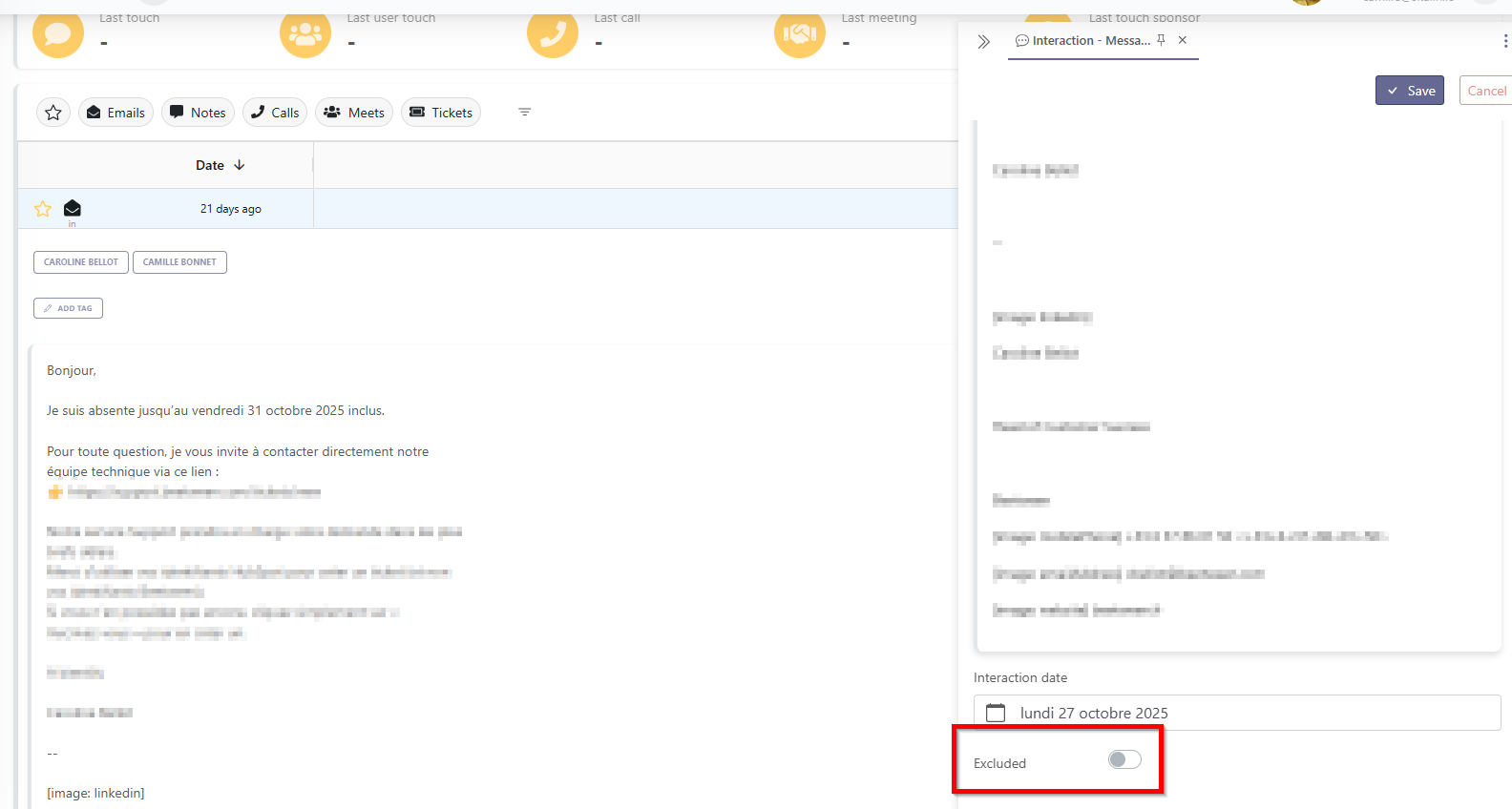
A default exclusion list is automatically applied to all emails (see details at the bottom of this page). You can also add additional exclusion rules for each interaction type from General Settings > Interaction Settings.
Info
New exclusion rules do not apply retroactively to interactions already recorded. If you would like them applied to your customers' history, you can request this from your Skalin CSM. Any future interactions will automatically be covered by the new rule from the moment it is created.
Here is the list of emails automatically excluded by default:
- all senders whose email address start with: 'no-reply@', 'noreply@', 'donotreply@', 'do-not-reply@', 'notifications@', 'alerts@', 'system@', 'info@', 'contact@', 'admin@', 'bot@', 'mailer@', 'mailer-daemon@', 'postmaster@', 'service@', 'updates@', 'newsletter@', 'welcome@', 'hello@', 'feedback@', 'survey@', 'invitations@', 'calendar-notification@', 'microsoft@'
- all emails from senders containing: 'auto-reply', 'out-of-office', 'vacation', 'autoreply', 'outofoffice', 'vacationreply'
- all subjects containing:
- 'Out of Office', 'OoO', 'Auto Reply', 'Vacation Notice', 'Out of Office AutoReply', 'Out of Office Notification', 'Réponse automatique', 'Absent(e) du bureau', 'Absence Re:', 'Message d'absence du bureau Re:'
- 'Undelivered Mail', 'Delivery Status Notification', 'Delivery Failure', 'Mail Delivery Subsystem', 'Mail System Error', 'Mail Delivery Failed', 'Delivery Report', 'Message Not Delivered', 'Message Delivery Failure', 'Mail Returned', 'Non-delivery report', 'Votre e-mail a été lu', 'Read receipt'
- 'Accepté:', 'Accepted:', 'Reçu:', 'Received:', 'Message reçu', 'Message lu', 'Message ouvert', 'Message consulté', 'Message visualisé', 'Message affiché', 'Message pris en compte', 'Votre message a été reçu', 'Votre message a été lu'
- 'Your ticket has been created', 'Ticket created', 'Support Ticket', 'Support Request', 'Support Case', 'Support Inquiry', 'Support Issue', 'Support Notification', 'Support Alert', 'Support Update', 'Support Follow-up', 'Support Response', 'Votre demande a été prise en compte'
Here is the list of calls automatically excluded by default:
- calls with the following status: 'BUSY', 'NO_ANSWER', 'NOANSWER', 'FAILED', 'CANCELED', 'CANCELLED', 'MISSED', 'QUEUED', 'RINGING', 'CONNECTING', 'CALLING_CRM_USER'
- calls with the following disposition: 'No answer', 'Left voicemail', 'Left live message', 'Wrong number', 'Left Message', 'Not in Service', 'Disconnected', 'Unavailable', 'Bad Number', 'No Longer in Service'