Trigger conditions
Trigger conditions
# Alerts linked to customer property
For each of the following triggers, don't forget to Show advanced filters to see all configuration possibilities.
New customer created: the alert is triggered when a new customer is created.
Customers' stage changed: the alert is triggered when a customer changes stage.
Customers' stage not changed: the alert is triggered when a customer stage has not changed for the past X days/weeks/months.
Customers' profile changed: the alert is triggered when a customer's healthscore profile changes.
Customers' renewal date arrives: this alert is triggered X days/weeks/months before a customer's contract renewal date. Reminder: For a tacitly renewable contract, the renewal date is calculated as the contract end date minus the notice period. For example, for a contract ending on 12/31 with a 3-month notice period, the renewal date would be 09/30.
Customers' agreement end date arrives: the alert is triggered X days/weeks/months before a customer's contract end date. It could also be X days/weeks/months after this date in case there is no new contract for this customer.
Customer's agreement first start date reached: the alert is triggered when the start date of the customer's first agreement is reached or passed.
Use case: target customers based on their subscription start date
This trigger is ideal for orchestrating actions based on when a customer first subscribed. For example, customers onboarded before the launch of a new platform version can be targeted with specific messages to help them get up to speed, while newer customers will have gone through an onboarding journey already tailored to the latest version.
Customer's CSM Pulse score changed : the alert is triggered when a CSM changes its CSM Pulse score on a customer.
Customer's CSM owner changed: the alert is triggered when a new account owner is assigned.
Customer became ghost: this alert is triggered when a customer becomes "ghost", i.e. none of its contact had any interaction with your company nor used your solution. By default, this parameter is set to 30 days without incoming interactions and 30 days without connection. These settings can be changed in Settings > General (opens new window).
Customer leave ghost: the alert is triggered when a customer reactivates, either through a recent interaction with your services, or by connecting to your solution.
Customer's tags added: the alert is triggered when one or more selected tags are added to a customer. This only concerns custom tags, excluding system tags. If a customer is created with tags already assigned, the alert will also be triggered, as the tags are considered added immediately after the customer is created.
Customer's MRR changed: the alert is triggered whenever a customer's MRR globally increases or decreases, or increases or decreases of more than X% or is greater or lower than X amount. Note: if the MRR is empty, the value is not equal to 0. Use the condition "value exists" in your filters accordingly.
Property name_of_your_custom_field changed: the alert is triggered when the selected custom field gets a defined value.
# Alerts linked to contact property
For each of the following triggers, don't forget to Show advanced filters to see all configuration possibilities.
- New contact created: the alert is triggered when a new contact is created.
- Contact's NPS changed : the alert is triggered when the NPS given by a contact is added for the first time or modified.
- Contact's tags added: the alert is triggered when one or more tags are added to a contact. This only concerns custom tags, excluding system tags.
- Contact's job title changed: the alert is triggered when a contact's job title changes.
# Alerts linked to healthscore
For each of the following triggers, don't forget to Show advanced filters to see all configuration possibilities.
- Healthscore entered danger zone: the alert is triggered when the health score drops from 4 or more to 3 or less (the score is now color-coded red).
- Healthscore left danger zone: the alert is triggered when the health score changes from 3 or less to 4 or more (the score is now color-coded yellow or green).
- Healthscore entered healthy zone: the alert is triggered when the health score changes from 6 or less to 7 or more (the score is now color-coded green).
- Healthscore left healthy zone: the alert is triggered when the health score drops from 7 or more to 6 or less (the score is now color-coded yellow or red).
- Healthscore changed: the alert is triggered when the health score changes. Trigger conditions can be refined in the advanced criteria.
# Alerts linked to interactions
For each of the following triggers, don't forget to Show advanced filters to see all configuration possibilities.
New interaction created: the alert is triggered when a defined interaction is created, provided that its type (email, note, call, meet, ticket), direction (in or out) and status are defined
Interaction date arrived or reached: the alert is triggered X days/weeks/months after a defined interaction occurred.
Interaction's tags added: the alert is triggered when one or several defined tags are added to a defined interaction.
Interaction title modified: the alert is triggered when the title of an interaction is modified. You can specify a condition on the title: equal to, matches, contains, starts with, or ends with the string you enter in the associated field.
Use case: automatically detect QBRs and training sessions
This trigger is especially useful for identifying when a QBR or training session has taken place, and automatically adding the corresponding tag to the interaction. This is particularly valuable for users who rely on interaction goals: by tagging the right interactions automatically, goals are updated without any manual action.
No customer touch: the alert is triggered when you have no exchange with a single contact within an account (note: unanswered emails are not counted as a point of contact).
No contact touch: the alert is triggered when you have no exchange with a given contact (note: unanswered emails are not counted as a point of contact).
Average sentiment score evolution: the alert is triggered when the sentiment score globally increases or decreases, or increases or decreases of more than X% or is greater or lower than X, on a given timespan.
You can define the no-contact period directly in the trigger.

Tip
Advanced filters give you access to additional criteria. For example, you can filter the "No contact touch" trigger by using the Tags attached to the contact to specifically target your "Champions", for example.

When configuring a new interaction alert…
It is important to know that an alert which triggers when a user had no interaction for the past 15 days will not trigger on the 16th or 17th day without interaction: it sticks strictly to the defined number of days.
The same way, it will not trigger automatically on all customers with whom you haven't had interactions for more than 15 days. When activating the alert, make sure to apply it manually to those customers by filtering on Customer last touch + relative date + More than N days ago.
# Alerts linked to usages
For each of the following triggers, don't forget to Show advanced filters to see all configuration possibilities.
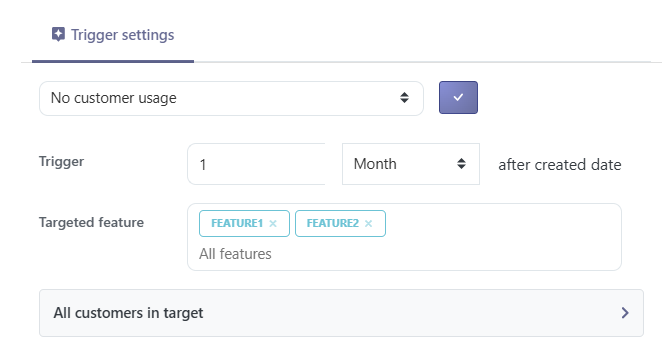
- No customer usage: the alert is triggered if none of a customer's contacts have ever used the tool for X days/weeks/months after the account was created.
- No contact usage: the alert is triggered if a contact has never used the tool X days/weeks/months after its creation.
- No customer usage since: the alert is triggered when a customer has not used the tool for a given amount of time, defined in the parameters.
- No contact usage since: the alert is triggered when a contact has not used the tool for a given period of time, defined in the parameters.
- New customer usage since: the alert is triggered when a customer uses the tool again after a defined period with no usage, this period is defined in the parameters.
- New contact usage since: the alert is triggered when a contact uses the tool again after a defined period with no usage, this period is defined in the parameters.
- First customer usage: the alert is triggered X days/weeks/months after a customer has used the product for the first time.
- First contact usage: the alert is triggered X days/weeks/months after a contact has used the product for the first time.
When configuring a new usage alert…
It is important to know that an alert which triggers when a user has not used your product for the past 15 days will not trigger on the 16th or 17th day without usage: it sticks strictly to the defined number of days.
If you want to get alerted whenever a customer hasn't used the product for more than 15 days from when you set up the alert, you'd rather set up a playbook with the same trigger, which you manually launch filtering on Customer last activity + relative date + More than N days ago.
The following triggers monitor changes in usage volume rather than the absence of usage.
Setup help
Not sure which configuration to choose? Answer a few questions and the assistant suggests a starting setting to test.
What counts as an event
For the usage drop, increase and variation triggers, it is the events that are counted. A visit counts as a standard event: the sum of the number of visits and the number of features used is what gets compared from one period to the next.
- Customer usage drop: the alert is triggered when a customer's usage falls by at least a defined variation threshold, measured over a sliding comparison window. For example, with a one-month window, Skalin compares the sum of events over the last 30 days to the previous 30 days; if the drop reaches the chosen threshold (e.g. 20%), the alert is triggered. Default thresholds are 10, 20, 30 and 50%, but any value up to 200% can be selected.
- Customer usage increase: works exactly like the usage drop, but is triggered when the latest period's usage exceeds the previous period by at least the defined threshold.
- Contact usage drop / Contact usage increase: the contact-level equivalents of the two triggers above. Particularly useful when only the usage of specific users matters.
Sliding window and threshold calibration
The comparison window is always sliding: it compares the latest period to the immediately preceding period of the same length. There is no minimum event threshold. So if a customer has only two equally active users and one of them takes two weeks off, a 2-week comparison window will trigger a drop alert of at least 50%.
Calibrate the threshold and window according to your average number of users per account and the usage frequency of your solution: a tool used daily doesn't call for the same window as one used once every two weeks.
For these triggers, the detection preview is mainly indicative: in practice, only the current point and the previous period's point actually matter.
Nightly computation and sliding periods
The usage drop, increase and variation triggers are recomputed every night, always on sliding periods: the latest analysed period ends the day before, not at the end of a calendar week.
This is why a trigger's values don't appear as-is in the Product Adoption report, which shows usage calendar week by calendar week. Both measure the same thing, but not on the same split: a 2-week sliding window ending on a Wednesday doesn't line up with the last two Monday-to-Sunday weeks in the chart.
Filtering by feature
Usage triggers can be filtered by a specific feature — both the no-usage triggers and the usage drop, increase and variation triggers (at customer and contact level). Enter the feature name in the field provided (copy it from the feature list visible in the Product Adoption report). You can add multiple features by pressing Enter between each name; an OR filter then applies, and the alert triggers as soon as any one of them matches.
Only the weekly and monthly active users triggers cannot be filtered by feature.
Use case: focus on key features. If you primarily track the features that carry the value and should be used regularly, filter on those key features rather than on setup ones. Early in the account's life, the administrator configures the platform, which inflates usage: including this setup in the normal would make the return to everyday usage look like a drop. For the same reason, consider restricting the alert to customers in the run phase using the advanced filters, so it doesn't fire during onboarding.
- Weekly active users drop: the alert is triggered when the number of weekly active users (the Weekly Active Users indicator) falls by at least a defined threshold (10, 20, 30, 50% or a custom value).
- Weekly active users increase: the same, for an increase.
- Monthly active users drop / Monthly active users increase: the same principles applied to the Monthly Active Users indicator.
The following trigger works differently: instead of comparing the latest period to the single preceding period, it compares recent usage to a longer reference period to spot statistically abnormal swings.
Usage drop or usage variation: which to choose?
The usage drop applies a fixed threshold: simple and predictable, it fits when you have a clear expectation and fairly stable usage. But a single rule quickly shows its limits:
- Customers of different sizes: with a 30% threshold, a customer with one or two users triggers as soon as someone goes on holiday, while a customer with thirty users almost never does. The same percentage doesn't mean the same thing depending on account size.
- Slow erosion: the usage drop only compares two consecutive periods. A loss of a few percent each week never crosses the threshold at once, yet it can halve usage over a few months without ever triggering.
- Irregular usage: a customer who uses the platform in bursts triggers on every normal dip, which multiplies false alerts.
In these cases, prefer the usage variation: it learns each customer's own normal and adapts automatically to their size, rhythm and regularity. A single trigger then covers your whole portfolio, without multiplying scenarios.
- Customer usage variation: detects abnormal usage swings relative to the customer's normal. The options are set in this order:
- Direction: Both (spikes up as well as down), Increase or Collapse.
- Detection mode and sensitivity: Sensitive, Recommended or Strict; the mode sets the threshold in σ, which the sensitivity slider lets you fine-tune (see box).
- Comparison window: the length of the analysed period (day, week(s) or month(s)).
- Reference: the number of preceding periods used as the basis for comparison. Example: a one-month window with 6 reference periods compares the last month to the previous 6 months; a 2-week window with 10 periods compares it to the previous 20 weeks.
- Minimum gap: the minimum number of events of deviation required to trigger (see box).
- Contact usage variation: the contact-level equivalent of the trigger above.
Visualise the impact of the window and the reference
To see concretely how the comparison window and the number of reference periods act on regular or irregular usage, open the interactive simulator.
Minimum gap and detection preview
The minimum gap is an absolute filter, expressed in number of events: the latest window must deviate from normal by at least this number of events to trigger. This is useful when a customer has very little usage, where the slightest event would otherwise be enough to trigger the alert. A value of 0 disables this filter (purely statistical detection).
In the detection preview, each point represents a period (one or more weeks, or one or more months depending on your choice) and the total number of points matches the reference period.
Understanding the normal and standard deviations
Skalin first establishes a normal: the average usage over the reference period (for example the last 6 months). The standard deviation — written σ (sigma) — measures the usual spread around that average, i.e. the size of the variations considered "normal" from one period to the next.
The trigger reacts when the latest window's usage moves away from the normal by more than a given number of standard deviations:
- Sensitive: from 1.5 σ — reacts to moderate deviations (more alerts, more false positives).
- Recommended: from 2 σ — detects clear anomalies.
- Strict: from 2.5–3 σ — only pronounced anomalies.
The higher the σ threshold, the larger the deviation from normal has to be before it counts as abnormal.
Take a customer whose usage over the 6 reference periods hovers around 40 events: 40, 42, 38, 41, 39, 40. Its normal (average) is 40 and its standard deviation about 1.3: from one period to the next, usage typically varies by a little over one event. In Recommended mode (2 σ), the latest period would have to fall outside the ~37 to 43 range to trigger; in Sensitive mode (1.5 σ), that range tightens to about 38 to 42.
So the regularity of usage plays a central role:
- Very regular usage gives a small standard deviation: the slightest variation looks abnormal and triggers quickly. This helps catch a change early, but can multiply false positives — hence the value of the minimum gap in number of events.
- Erratic usage gives a large standard deviation: a substantial variation is needed to trigger, which avoids reacting to every minor fluctuation.
Regime change or seasonality: choosing the reference period
A long reference period gives a stable normal, but only if the past still resembles the present. Before extending it, ask whether the period contains a regime change, that is a lasting shift in level or rhythm.
- In case of a regime change (for example a customer who has become more regular but at a lower level), a reference reaching back before the change mixes two normals. It inflates the standard deviation and makes the trigger blind to genuine drops in the new regime. Anchor the reference on the current regime only.
- In case of seasonality (a pattern that repeats every year), a reference of about 52 weeks is instead relevant: a seasonal trough won't be mistaken for an anomaly.
In short, a long reference is only an asset if the distant past is still representative. Otherwise, prefer a shorter reference, anchored on the customer's current rhythm.
# Setup assistant
Answer a few questions to get a starting configuration to test, then adjust it based on your results.
1. Your accounts' size (number of users) is…
2. Your customers' usage is mostly…
3. How often is your tool meant to be used?
4. What do you want to detect?
Multiple choices allowed. Each need may call for a separate trigger.
5. Has there been a recent break on this scope?
6. How much usage history do you have on these customers?
7. Do you track specific key features?
# Alerts linked to opportunities
For each of the following triggers, don't forget to Show advanced filters to see all configuration possibilities.
- New opportunity created: the alert is triggered as soon as a new opportunity is created on a given pipeline.
- Opportunity assigned to user: the alert is triggered when a new user is assigned to an opportunity from a defined pipeline, whether this is the first assignment or a modification.
- Opportunity won: the alert is triggered when an opportunity from a defined pipeline is won.
- Opportunity lost: the alert is triggered when an opportunity from a defined pipeline is lost.
- Opportunity's stage changed: the alert is triggered when the stage of an opportunity from a defined pipeline changes.
- Opportunity's stage not changed: the alert is triggered when the stage of an opportunity from a defined pipeline has not changed for the past X days/weeks/months.
- Opportunity close date arrives: the alert is triggered X hours/days/weeks before or after an opportunity's close date.
# Alerts linked to tasks *
For each of the following triggers, don't forget to Show advanced filters to see all configuration possibilities.
- New task created: the alert is triggered as soon as a new task is created.
- Task assigned to user: the alert is triggered when a new user is assigned to the task, whether this is the first assignment or a modification.
- Task completed: the alert is triggered when a new task is completed.
- Task due date arrives: the alert is triggered X hours/days/weeks before or after a task's due date (note that when you create a task, you decide whether or not it is eligible for these reminders).
# Alerts linked to task projects *
For each of the following triggers, don't forget to Show advanced filters to see all configuration possibilities.
- New tasks project created: the alert is triggered as soon as a new project is created.
- Tasks project completed: the alert is triggered when a project is completed.
- Tasks project due date arrives: the alert is triggered X hours/days/weeks before or after a project's due date (= the latest close date of all of its tasks).
# Alerts linked to Playbooks *
- Playbook activation need user action: the alert is triggered when you need to perform a manual action on a Playbook in order to resume the Playbook: manual splits, manual validation steps, emails to check before sending them.
* These triggers are only available as an alert, not as a playbook.