Interaction Settings
Interaction Settings
# Automatic Interaction Exclusion
The interaction score takes into account all scores assigned to active interactions. If certain interactions should not be included in this score calculation, you need to exclude them. By default, there is a list of email exclusions (opens new window); you can add exclusions specific to your business and context on top of that.
In General Settings > Interaction Settings, add your various rules for emails, notes, meetings, etc.
# Auto-BCC
If you want to CC your CRM on exchanges created from Skalin — whether from playbooks or from a customer's Interactions section — add your CRM's BCC address here. You can also add a team member's address or a generic address that should be blind-copied on all outgoing emails.
# Interaction Snippets
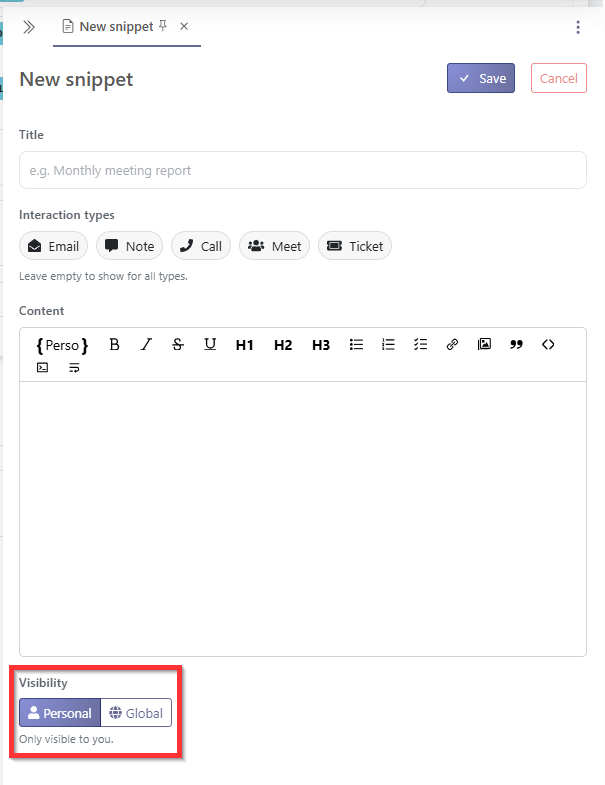
A snippet is an interaction template that can be used in various places in Skalin to create a new note, a new email, or to fill in an email created from the Interactions section or from a playbook. A template can apply to all interaction types or be specific to notes, meeting summaries, or tickets.
Snippet Visibility Each snippet can be saved:
- for yourself only,
- at the team level,
- or at the global level, so that all other Skalin users can access it.
Tips
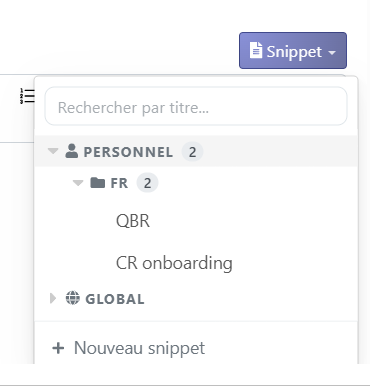
To organize your snippets into folders, you can use // in the snippet name to create a hierarchy. For example, the snippets:
- fr//QBR
- fr//CR onboarding
will be displayed as follows:
To help you get started, we have created a list of snippets in the Global section that you can edit and adjust to fit your own practice. You will find:
- 01 Sales → CS Handoff
- 02 Kick-off
- 03 Onboarding check-in
- 04 Recurring check-in
- 05 Business review
- 06 Escalation plan
- 07 Expansion / upsell
- 08 Renewal
- 09 Churn interview
Tips
These snippets are templates based on CS best practices. Feel free to use them as a starting point before a customer meeting!