Playbook goals
Defining objectives on playbooks and measuring their achievement
The "Goals" tab of a playbook lets you define one or two business objectives associated with that playbook. The idea is to set a measurable indicator that Skalin can track, in order to validate whether the playbook's goal has been achieved or not.
For example, for a contact reactivation playbook targeting users who haven't logged into your platform in a long time, you can measure whether they reconnect within a few days of being contacted. Or for a new customer onboarding playbook, you can measure whether they successfully move to the Adoption phase at the end of the playbook.
Once the objective is defined, you can find the results directly in the relevant playbook under the "Objectives" tab, or in the dedicated "Playbook Objectives" report.
# Setting up an objective
# Objective types
Start by selecting the type of objective you want to achieve. This can be:
- a score
- a tag added to a customer or a contact
- a stage to reach
- a specific value taken by a custom field
- a re-engagement with your customer or contact, whether by email, ticket, or a scheduled meeting
- a new login to your platform by your contact or customer
- the use of one or more specific features, detected via tracking or via a webhook
- or an increase or decrease in MRR for that customer.
# Details by objective type
Score: you can set an objective on the global health score, or target more specifically:
- the interaction score
- the usage score
- the contract score
- or the CSM Pulse
You can then specify whether you want this score to increase or decrease (by X points), reach a target value, or go above or below a threshold.
Example: Your playbook provides a series of tips & tricks to make platform usage more regular, or informs users about how your platform works for teams → you can measure whether the usage score increases by at least one point after 2 weeks.
Tag: whether for a customer or contact tag, you simply enter the value you want to obtain.
Example 1: For a playbook that qualifies a customer's primary language, you can set an objective that 100% of customers must have a language tag at the end of the activation.
Example 2: If your playbook helps you re-engage with sponsors you haven't spoken to in a long time, you can measure whether all sponsors who went through the playbook have the tag added at the end. This will help you validate whether detecting lack of contact and sending a pre-written email represents a real time saving.
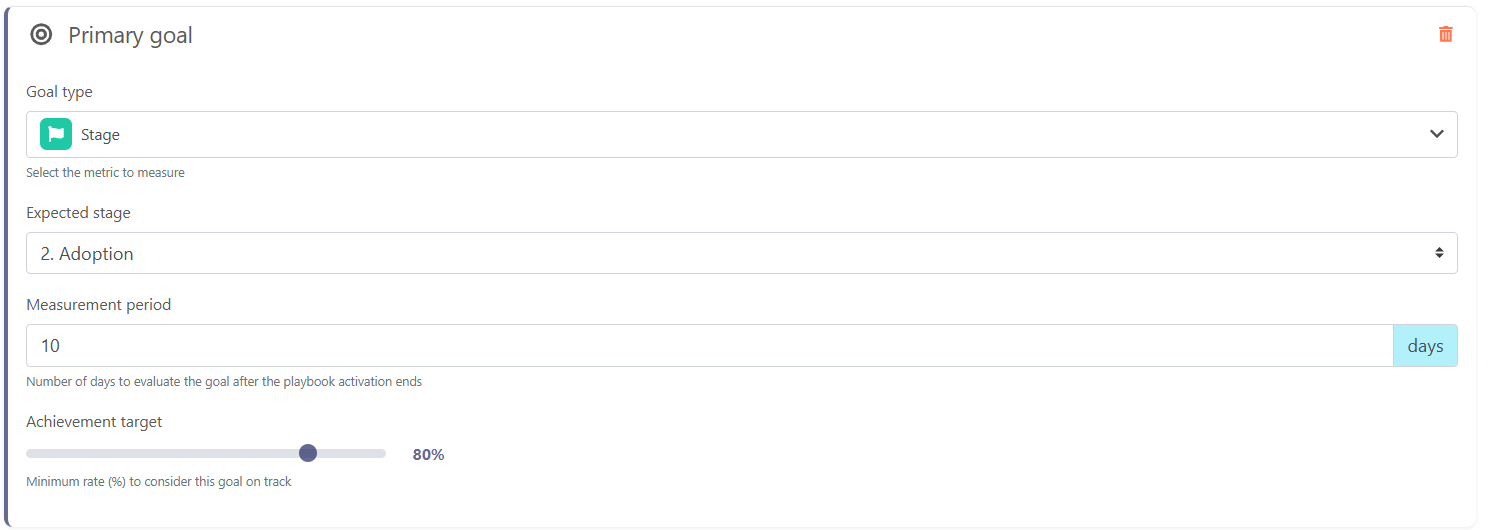
Stage: you simply enter the stage that should be reached by the end of the objective measurement period.
Example: For a customer renewal management playbook, you can measure that at the end of the notice period, the customer remains in the RUN phase.
Custom field: all fields of type Number, Enum, or Score associated with the customer or contact can be selected. Then enter the desired value (depending on the field type, this value is defined differently).
Example: For a playbook that sends a demo about an add-on module identified as an opportunity for a customer, measure whether the field tracking interest in that module moves to "Negotiation in progress."
Re-engagement: you can choose which type of interaction will validate the achievement of the objective — a received email or call, a meeting, a note, or a ticket — specifying whether a specific tag must be present.
If the playbook is triggered at the customer level, then the target interaction can be fulfilled by any contact at that customer. If the playbook is triggered at the contact level, you can decide whether to take into account interactions with the contact targeted by the playbook, or with any contact at that customer.
Example: If your playbook detects that a customer has had no contact with you for 2 months (you may have written to them, but they haven't written back or attended a meeting in 2 months), you can measure whether re-engagement actually occurred following the actions taken in the playbook.
Login: the measurement is straightforward — it checks that the targeted contact, or one of the customer's contacts, has logged into your platform (depending on the chosen playbook trigger type).
Example: If your platform is subject to seasonality, a playbook can invite customers affected by the start of their season to log in and discover new features to prepare for the upcoming season. You can measure whether they actually log in following your communication.
Feature usage: enter the targeted feature(s) as they appear in the "Product Adoption" view. Press "Enter" to separate each feature.
Example: If a playbook aims to inform customers about a new highly anticipated feature, you can measure whether customers actually use that feature following the activation (this requires usage tracking to be set up for it).
Webhook (feature): in the same way as for "feature usage", enter the targeted feature(s), provided they are recorded via a webhook. You can find them in the "Product Adoption" view by filtering on webhooks.

MRR: specify whether you are targeting a threshold to reach or exceed, a simple increase, or a percentage increase or decrease in MRR.
Example: For a playbook aimed at upselling a feature priced at €50/month, measure whether the customers' MRR actually increases by €50 at the end of the activation.
# Measurement period
Regardless of the objective type chosen, you must select the period during which the measurement should be taken. The period always starts when the playbook is activated for a customer, and ends X days after the playbook activation completes for that customer.
For example, if your onboarding playbook consists of a series of emails scheduled over 20 days, and you want to verify that your customer exits the "onboarding" stage within 30 days, you can set the measurement period to 10 days. The customer will then have the 20 days of the playbook duration plus the 10 additional days to change stage.
Playbooks with long durations
Be careful with playbooks that include long wait steps: there is a risk they will only complete after several months or even years, meaning you may only be able to measure objective results on very few customers, or wait for a very long time before getting results. In these cases, we recommend breaking up these playbooks to simplify them and improve measurement.
# Achievement target
Finally, you can define the minimum percentage of customers that must meet the criteria you have chosen in order to consider the overall objective achieved. Continuing with the previous example, you might consider the onboarding objective achieved if 80% of customers exit the onboarding stage within 30 days.
# Viewing objective results
Playbook objective measurement results are displayed both in the "Goals" tab of the relevant playbook and in the dedicated "Playbook Goals" view.
# Viewing objective achievement on a playbook
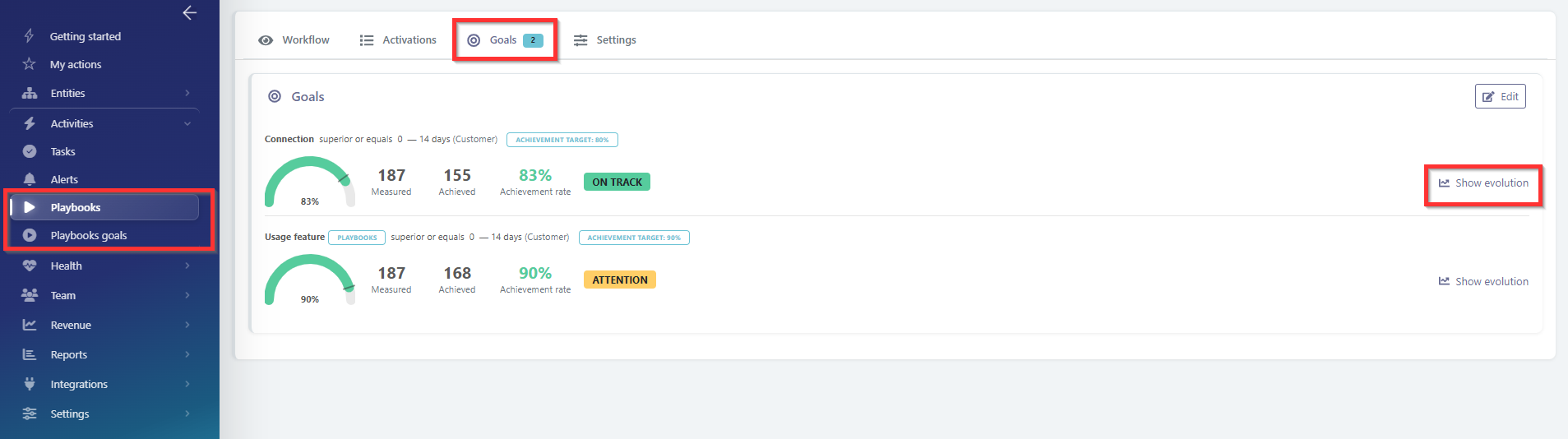
In the example above:
- Objective 1 measured whether the customer logged in at least once within 14 days after the end of the playbook activation.
- You can see that 216 customers activated the playbook, and 184 actually logged in within 14 days of the activation ending. This represents an achievement rate of 85%, above the target set for this objective, which was 80% (shown by the bar on the gauge).
- The green indicator "On track" is therefore displayed.
Good to know
If you have placed a "Stop the playbook if conditions apply or do not apply" module right after the playbook trigger, customers who exit at that step are counted among the "measured" customers. You should therefore adjust your objective achievement rate taking this into account.
Viewing the evolution
In the chart displayed:
- The left vertical axis corresponds to the success rate across the different versions of the playbook; the right axis corresponds to the number of activations measured by playbook version.
- Solid curves correspond to the success rate, while dashed curves correspond to the number of activations.
- Blue curves represent the results of version 3 of the playbook, while green curves represent version 4.
- The red dashed curve represents the target to achieve.
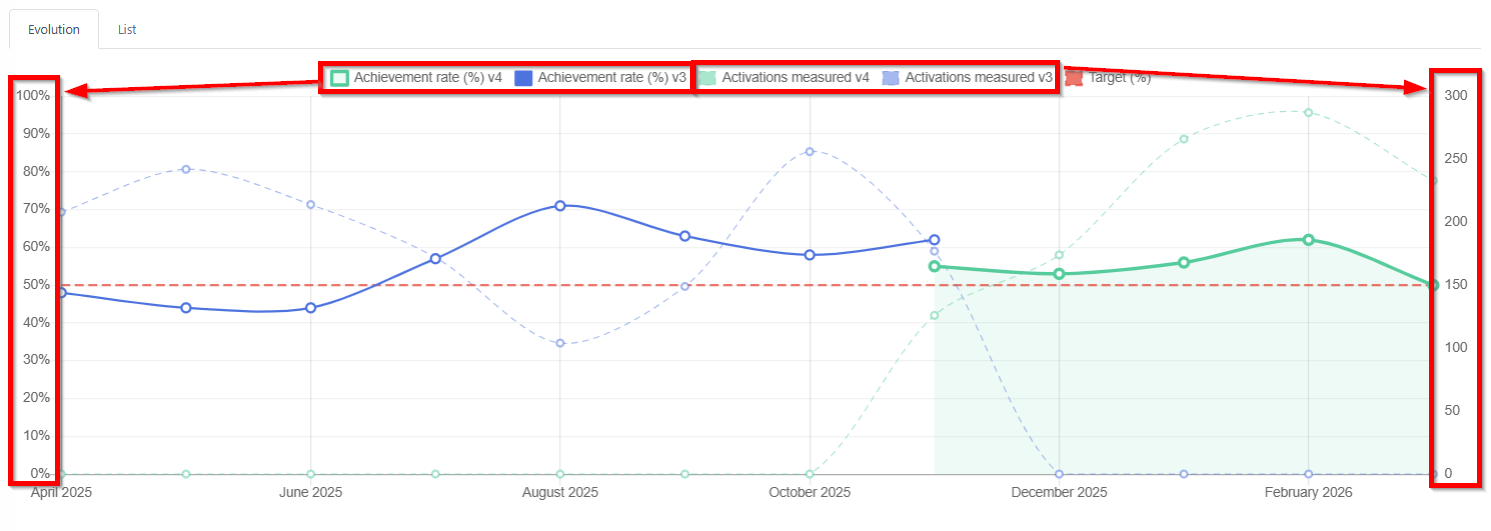 It is clearly visible that from June 2025 onwards, the success rate of this playbook began to increase and then stabilized. Version 4, however, does not appear to improve objective achievement results.
Viewing the list of customers/contacts who achieved or did not achieve the objective
Click on the "List" tab to see the detailed list of customers or contacts who activated the playbook, along with whether or not they achieved the objective. The achievement date is only filled in if the objective was achieved.
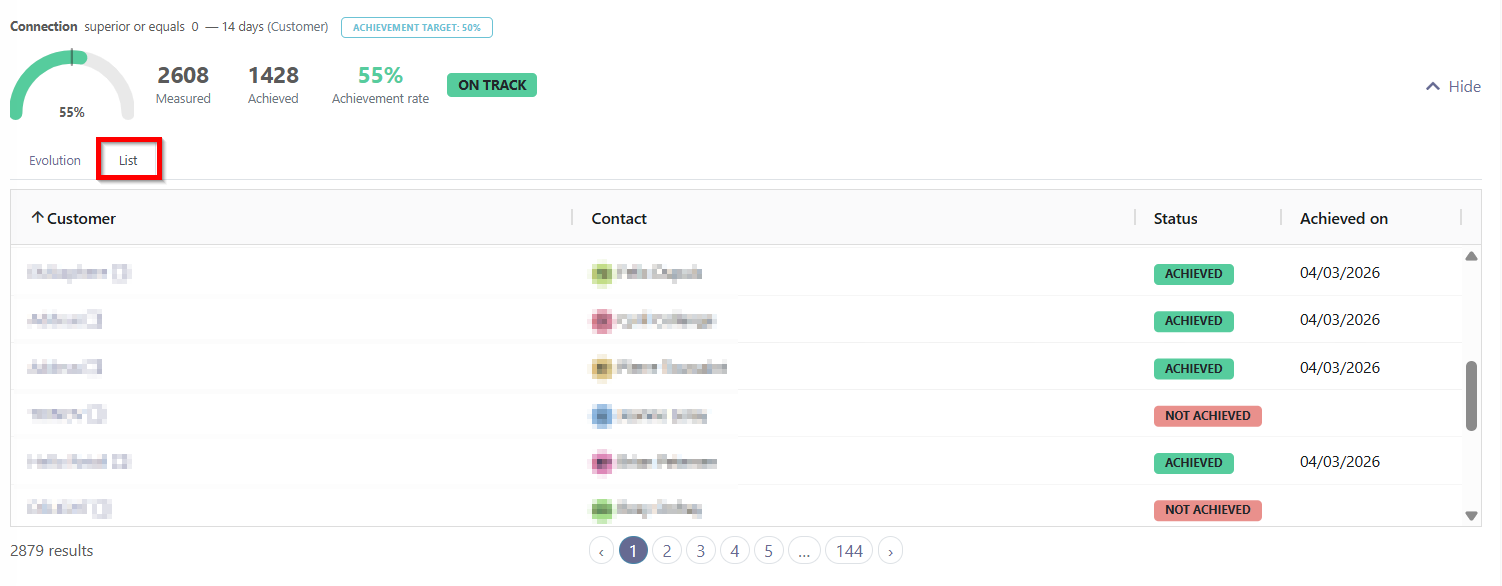
All results related to playbook objectives can be found in the "Playbook Objectives" report.
Checking whether one or two objectives have been defined on a playbook without opening it
From the Activities > Playbooks menu a small icon indicates on the right side where the one or two objectives are defined.
