Inspirational list to create playbooks
Inspirational list to create playbooks
- 1. Customer Qualification
- 2. Contacts Qualification
- 3. Segmentation and allocation of accounts
- 4. Onboarding a new customer
- 5. Onboarding a new user
- 6. Helping you get to grips with SaaS
- 7. Reacting to a drop in account usage
- 8. Responding to a drop in contact usage
- 9. User Welcome-back
- 10. Follow-up plan by account type
- 11. Create alerts to keep better track of customers
- 12. Reacting to a bad NPS
- 13. Asking for a Review
- 14. Action plan for Customers at Risk
- 15. Anticipation of renewals
- Onboarding a new customer
- Offboarding a customer
- Managing QBRs (quarterly business reviews)
- Analyzing a customer's situation, building a success plan, and managing opportunities
- Managing customer segmentation
- Managing renewals smoothly
- Preventing churn
- Growing the CS team
- Driving adoption of a new feature
It is not always easy to know where to start with playbooks. That is why we have compiled in this blog post (opens new window) the 15 essential playbooks you should think about when setting up Skalin.
We have also compiled a collection of playbook ideas that have been tested and validated with some of our customers. Feel free to draw inspiration from them and adapt them to your own context.
Reminder on what will make your playbook a game changer (or not) in your organization
When setting up a playbook, choosing the right trigger is certainly important, but what matters most is the set of actions that follows it.
For example, creating a task that simply says "contact the customer" is far less effective than:
- defining all the parameters to analyze before reaching out to the customer,
- pre-writing an email with different strategic approaches for re-engaging the customer (the CSM then only needs to choose the right strategy rather than starting from scratch on a time-consuming drafting task),
- thinking through the logical sequence so the CSM knows exactly what to do in each situation.
If you want to share best practices, embed them in your playbooks and use them to help your team grow.
# The 15 playbooks (qualification, onboarding, run, renewal) to think about when getting started
# 1. Customer Qualification
Before implementing monitoring or onboarding playbooks, start with qualification playbooks. These will then enable you to create effective, personalised workflows.
In practical terms, you can qualify your customers based on several parameters:
Language of communication: To standardise the process, specify the language preferences of your customers. When a new customer joins, a playbook can determine whether they prefer French, English, a combination of both, or another language. Each new contact will automatically receive a tag indicating the customer's preferred language. For accounts with multiple languages, you'll be prompted to select the preferred language for each contact for future communications.
Subscription plan: Upon acquiring a new customer, a playbook can prompt you to specify their subscription plan. Why is this important? This information will impact subsequent playbooks. For instance, onboarding or support levels can be tailored based on the plan chosen by the customer.
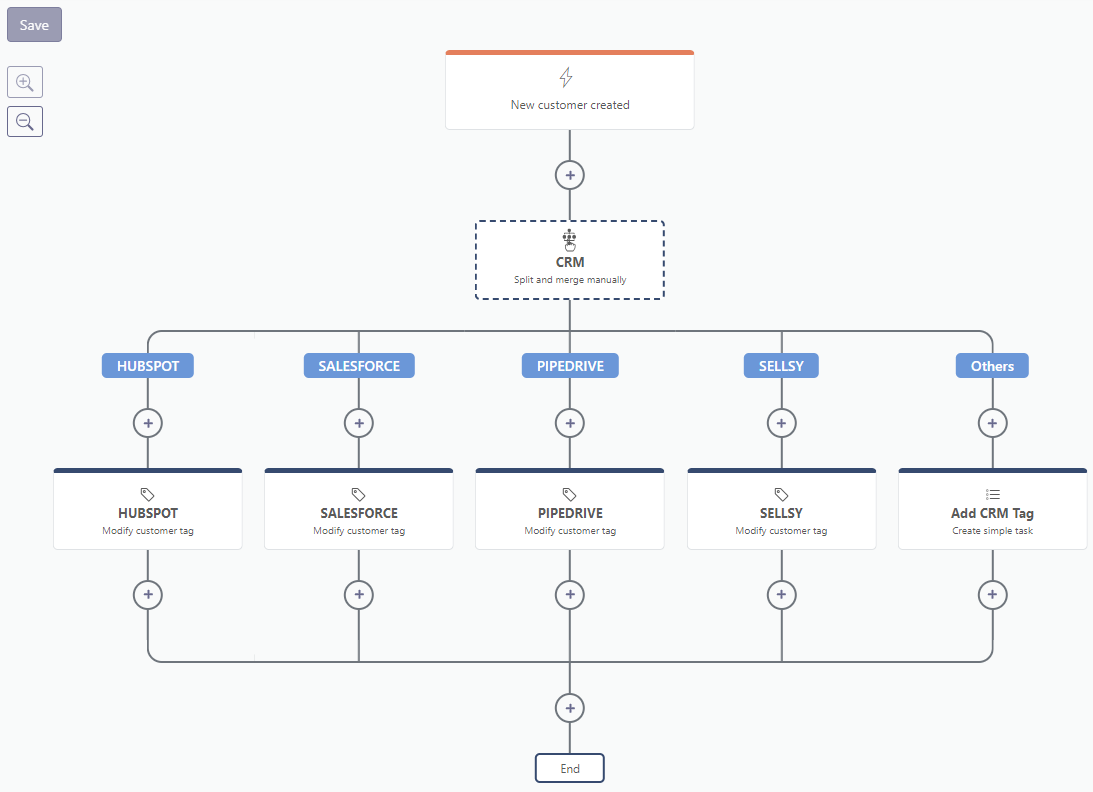
Technology stack: this could include CRM, HRIS, or e-commerce platforms. Have the CSM qualify this information when a new customer comes on board.
# 2. Contacts Qualification
Similarly, before developing more operational playbooks, it's essential to understand how to respond based on the type of contact. Why? Because different contacts have different expectations. For instance, if your sponsor isn't utilizing the platform, that's acceptable. However, if your champion hasn't logged in for several weeks, there might be an issue.
This is where Contact Qualification Playbooks prove invaluable. They ensure the appropriate roles are assigned to the right individuals. The trigger condition can be set at the contact creation stage. However, this doesn't apply to pre-existing contacts. To address this, you can employ a catch-up playbook triggered after each interaction between the CSM and the customer if the contact hasn't been qualified previously.
Moreover, if you're dealing with a large customer base, you might become overwhelmed with requests during contact creation. Opt for a playbook triggered only during exchanges, such as via email or phone, enabling you to qualify contacts progressively.
# 3. Segmentation and allocation of accounts
This essential playbook begins by prompting the team manager to assign a CSM immediately upon the arrival of a new customer. The designated CSM receives a notification requesting them to specify whether the account is considered high-potential or not. Subsequently, the account is automatically categorized into a segment based on its potential and MRR.
Customers with both high MRR and high potential fall into a distinct category, differing, for example, from customers with high MRR but limited development potential.
# 4. Onboarding a new customer
The segmentation phase is crucial for crafting effective onboarding playbooks. You can tailor the onboarding process based on customer segments. For instance, it's advisable to provide personalized support to high-value customers, incorporating more human touchpoints. Conversely, for customers with lower Monthly Recurring Revenue (MRR), a digital pathway may be more suitable. The goal is to empower customers to complete as much of the onboarding process themselves as possible, leveraging self-service content in particular.
In practical terms, branching enables the creation of distinct onboarding scenarios tailored to your segments.
# 5. Onboarding a new user
Once the customer is in the operational phase, your users evolve and new ones are added. It's advantageous to create a playbook triggered when a new contact is created to provide them with essential information and contact points.
Possible communications include:
- An automatic welcome email.
- A welcome email approved by the CSM.
- Sending documentation.
- Sending the support address.
By introducing yourself to them, you mitigate the risk of users abandoning the platform due to a lack of understanding. They'll find it easier to reach out for assistance, distinguishing between satisfied users and those who disengage.
# 6. Helping you get to grips with SaaS
To promote platform adoption, we suggest triggering a scenario when a contact uses the solution for the first time. This also extends to the initial use of a specific feature. The concerned contact then automatically receives relevant content, such as a webinar recording on the topic or the URL to the documentation.
# 7. Reacting to a drop in account usage
If a customer isn't using your product as much as anticipated, one solution is to trigger a playbook when they've been inactive for a period. The duration of inactivity largely depends on your business, so it's essential to find the right balance. Subsequently, the playbook can send a Slack notification to the responsible CSM to inform them. Simultaneously, it can generate an automatic task for the assigned CSM in the Customer Success Platform.
Consider who to contact in this scenario. It's preferable not to contact everyone. This is where targeting the champion via the first playbooks becomes crucial: the champion is the key individual to engage with to obtain the necessary insights and find solutions. An example scenario involves sending an email, followed by receiving a task a few days later to verify if the appointment has been scheduled. The exit conditions, such as the contact's response or resumption of usage, will automatically conclude the playbook once the objective is achieved.
# 8. Responding to a drop in contact usage
The decrease in usage may be isolated to one contact rather than the entire account, requiring prompt action! For instance, if certain contacts within your account haven't logged in for 15 days, you'll receive a notification. Depending on the number of users under your management, it may be appropriate to target specific users, such as the "champion," to avoid being overwhelmed by notifications.
Furthermore, you can establish a split based on customer category. For a High Touch account, the CSM can assess whether the decrease in usage is typical or concerning. Conversely, for a lower-value account, a digitalised and automated approach is likely sufficient.
# 9. User Welcome-back
The final scenario regarding usage involves welcoming a user back after a period of inactivity on the platform. How can you encourage them to become more active and utilize the tool?
You can welcome them back by inviting them to training sessions. Additionally, if the user holds significance, you can arrange one-to-one meetings.
# 10. Follow-up plan by account type
The extent of customer follow-up varies according to the stage in the lifecycle and segmentation. Using a playbook automates these tasks, empowering the CSM to proactively manage accounts and facilitate your customers' advancement through the Customer Journey.That's right: the playbook does the thinking for you, allowing you to stay one step ahead in your customer interactions.
# 11. Create alerts to keep better track of customers
In addition to the proactive approach, consider the reactive aspect through alerting. For instance, if you're supposed to connect with your champion every 3 months and it's been 91 days since your last conversation, a scenario can be triggered to suggest scheduling a future meeting.
The action can be automatic, utilizing a pre-formatted email. Alternatively, you may opt to submit it to the CSM for validation, allowing for greater customization. If there's another touchpoint with the champion, the playbook halts. However, if there's still no response, you'll receive a reminder to send a follow-up email.
# 12. Reacting to a bad NPS
You've likely encountered this scenario before: a long-time customer provides a negative response in an NPS (Net Promoter Score) survey. A playbook can assist you in responding in a systematic manner to comprehend the concern. Allow a few days to pass before requesting the CSM to reach out to them, giving emotions a chance to settle. You can even assign a neutral team member, such as a support person, to manage these situations with minimal emotional involvement.
The objective is to suggest a meeting with this individual to understand what improvements they would like to see in the solution or in the relationship.
# 13. Asking for a Review
Have you received a positive NPS score? This could serve as an opportunity to request the customer to leave a review on an evaluation platform such as G2 or Capterra. In such instances, an automatic email will be prepared and ready to be sent. Additionally, each CSM can tag the contacts they deem relevant to ask for a review, even if they haven't responded to an NPS survey.
# 14. Action plan for Customers at Risk
You shouldn't wait until your customer's Health Score (opens new window) is in the red before taking action. The rationale is that improving an already poor score can be challenging. Essential in Customer Success are the playbooks that enable proactive measures before the score declines. Nonetheless, it might be beneficial to send a notification to the Slack CSM channel when an account's health deteriorates significantly. You can then segment the notification based on the type of customer to consider the level of effort you're willing to invest.
# 15. Anticipation of renewals
Finally, it's crucial to anticipate contract renewals. Take action 3, 4, or even 5 months before the renewal date to initiate appropriate measures.
In practical terms, you trigger a scenario based on the renewal date. Subsequently, you can employ a branching system depending on whether the customer is at risk and/or a strategic customer, enabling you to approach them differently. Implement a tailored action plan before sending reminders to ensure a smooth renewal process.
# The list of ideas seen at our customers'
# Onboarding a new customer
New customer (based on their segment): assign a CSM, add automatic tags, fill in the language if needed, send a pre-written email for the first onboarding step, launch the onboarding project, and send a Slack notification for internal purposes.
New contact at a customer: automated emails to welcome them, introduce the software, share the link to self-training resources, and provide the support team's email address.
If the customer self-onboards via your SaaS and stays too long in the onboarding phase → check whether they might already be in the run phase.
No tool usage one month after the customer kick-off → pre-written email to offer an additional follow-up session.
First time the customer creates something specific in your SaaS (e.g. first video, first process) → pre-written email to offer a review of what was produced.
Exit from the onboarding phase:
- Sending a qualitative onboarding survey
- Reminder of the method for requesting customer referrals
- Waiting period of a few months before suggesting a customer case study
# Offboarding a customer
- Offboarding → pre-written email to confirm the cancellation has been taken into account + 3 months later, sharing of sector-specific testimonials to attempt to win the customer back + removal of tags if needed.
- Categorize churn reasons → add appropriate tags + reminder to check the MRR view every 3 months for the number of churns by type.
# Managing QBRs (quarterly business reviews)
- QBR from A to Z: scheduling task + informational email containing customer details (renewal dates, current plan, etc.).
# Analyzing a customer's situation, building a success plan, and managing opportunities
- New feature used, custom usage score increased by X points → email to discover new use cases.
- New sign of activity from a contact after X weeks → pre-written "welcome back" email.
- Upsell or cross-sell → pre-written email to introduce the new feature, share inspiration, etc.
- Usage level reaches different thresholds → pre-written email to suggest additional services or tips for optimizing bulk actions.
- Opportunity created → pre-written email to the KAM or sales rep.
- Opportunity stagnating too long in the same stage → email to the owner for an update or new action.
- Detection of freemium customers with heavy usage who are highly satisfied with the solution, to offer them an upgrade to a paid plan.
# Managing customer segmentation
- Based on MRR, potential (custom field), or number of users → automatic assignment of the right health score profile.
# Managing renewals smoothly
- Renewal of an at-risk customer (low usage, no contact) → automatic triggering of an action plan.
- Unpaid invoices → pre-written email to inform the customer that their access is suspended + task to stop all ongoing follow-ups.
# Preventing churn
Health score turning yellow → pre-written email to suggest a check-in with the champion + checklist of items to review:
- last contact with the champion,
- unresolved technical issue or missing feature,
- competing solution being used in parallel,
- organizational change,
- potential interest from another internal team,
- proposal to test an additional feature, etc.
Health score turning red → check if the cause is known; if not, list the actions to take + associated templates, inspiration, and resources.
Decrease in customer or contact usage → pre-written email to the champion to offer a call or ask for clarification.
No contact with the champion for 3 months → follow-up to check in.
"Ghost" champion → decide whether or not to continue the playbook activation, share website news, new features, or use cases to explore.
Negative NPS → pre-written email to re-engage.
Positive NPS → pre-written email to request a review on G2 or Capterra + consider a marketing testimonial.
# Growing the CS team
- CSM change on a customer in the RUN phase → pre-written email to organize a meeting with the champion and sponsor + 2nd email if no response after 7 days.
# Driving adoption of a new feature
- Based on the feature and current usage (based on a custom score): automatic email to ask whether the customer wants more information, or to share inspiring use cases by industry.
Feel free to reach out to us to explore how to implement any of these playbooks in your specific context!