Modifying a Playbook
Modifying a Playbook
You can change your Playbook as often as you like, as long as it is not activated.

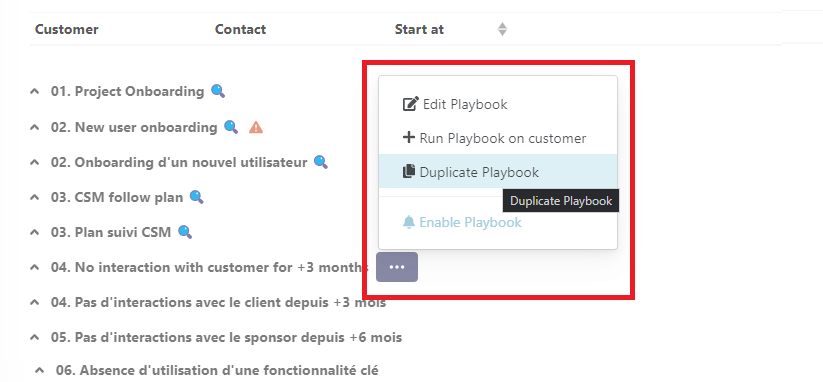
When a Playbook is running on one or more clients, you can't modify it: you'll have to click on "Duplicate Playbook" to make a copy that you'll save as V2, for example.
# Samples
Nota
To get started with Playbooks, we recommend you start by identifying the recurring actions that take up your time. There are undoubtedly many time-consuming things in your current processes that could be automated. Sometimes you don't even see them anymore, but they're there! Try to identify them and automate them using a Customer Success tool.
Playbooks will enable you to cover a wider field of action, which you simply couldn't manage humanly. And contrary to popular belief, they can be used for both high-touch and low-touch.
Here are the steps you need to follow to identify and prioritize the Playbooks you need to implement:
- Identify the weak points in your Customer Journey: for example, you know that your churn rate is too high compared with the industry average.
- Go back to the cause of the problem (the "5 whys"): my churn is too high because my customer didn't see the value of the product > he didn't see the value of the product because he didn't make sufficient use of certain functionalities > perhaps he didn't understand them properly > the functionality is seen too quickly during onboarding.
- Take inspiration from what has already worked for your company: perhaps some CSMs spend more time in training presenting this functionality. Capitalize on their experience to make it a standard.
- Reuse this material to design a high-performance Playbook.
- Prioritize by estimating the complexity of implementation vs. the expected benefit.
# Customer feedback
# Resources & Webinars
📆 [Webinar] Pitchy: The method for scaling Customer Success operations
Watch here (opens new window)📆 [Webinar] Fasterize: Scaling onboarding with Playbooks
Watch here (opens new window)📆 [Webinar] Vertuoza: Automate customer paths to manage hypergrowth
Watch here (opens new window)📰 [Blog] Karnott: Manage 1,700 customers with 4 CSMs thanks to Playbooks
Read here (opens new window)